
NavigationUpdated 3 hours ago
The third screen (swipe left) on the Portal shows the navigation display.
If your phone isn't connected, or doesn't have a navigation route active, it shows a simple compass.
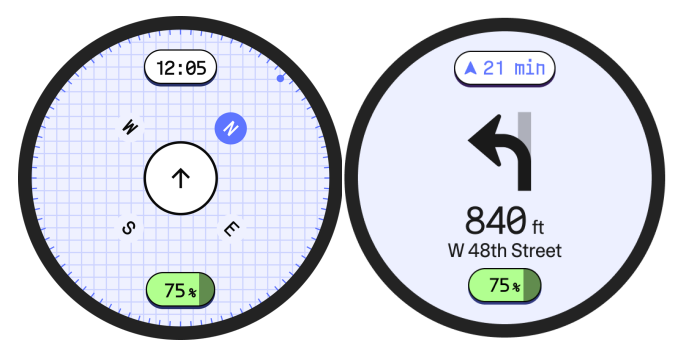
The navigation screen displays:
Estimated time to destination
Graphic of your next movement
Distance and description for your next movement
Estimated battery percentage remaining
You can choose between Turn view and List view:
Turn view only displays your next move.
List view displays your next TWO moves to let you plan ahead.
To change between Turn view and List view, tap and hold the center of the navigation screen.
You can also swipe right to end the navigation route.
You can create your navigation route in the Also app, or you can select Send Destination from another app that supports sharing (such as Google or Apple Maps).